
Speech Planning Journey
Navigate the complete speech planning journey from initial setup to final delivery. This comprehensive guide helps you understand each step of the process and how to guide your speakers effectively.
Journey Overview
1. Role Planning
Name your wedding and identify the key players including the couple, speakers, and wedding party members.
2. Balance Check
Review and balance between both families within the group of speakers and wedding party members.
3. Speech Planning
Plan the structure and content for each speech in your wedding celebration.
4. Content Planning
Organize and plan the specific content themes and topics for each speech.
5. Generate Plan
Generate your complete speech plan based on all the information you've provided.
6. Brief Speakers
Assign speakers, send briefing packs, and ensure everyone understands their role and responsibilities.
Starting the Journey
Access from My Projects
The speech planning journey can be started from multiple places, with the primary entry point being the My Projects page. This is the page users will land on after they have registered and logged in.
From the My Projects page, users can initiate a new speech planning journey or continue an existing one. The journey is also accessible to users who are logged out, though they will need to log in after a few screens to continue.
Step 1: Role Planning
Name Your Wedding and Identify Key Players
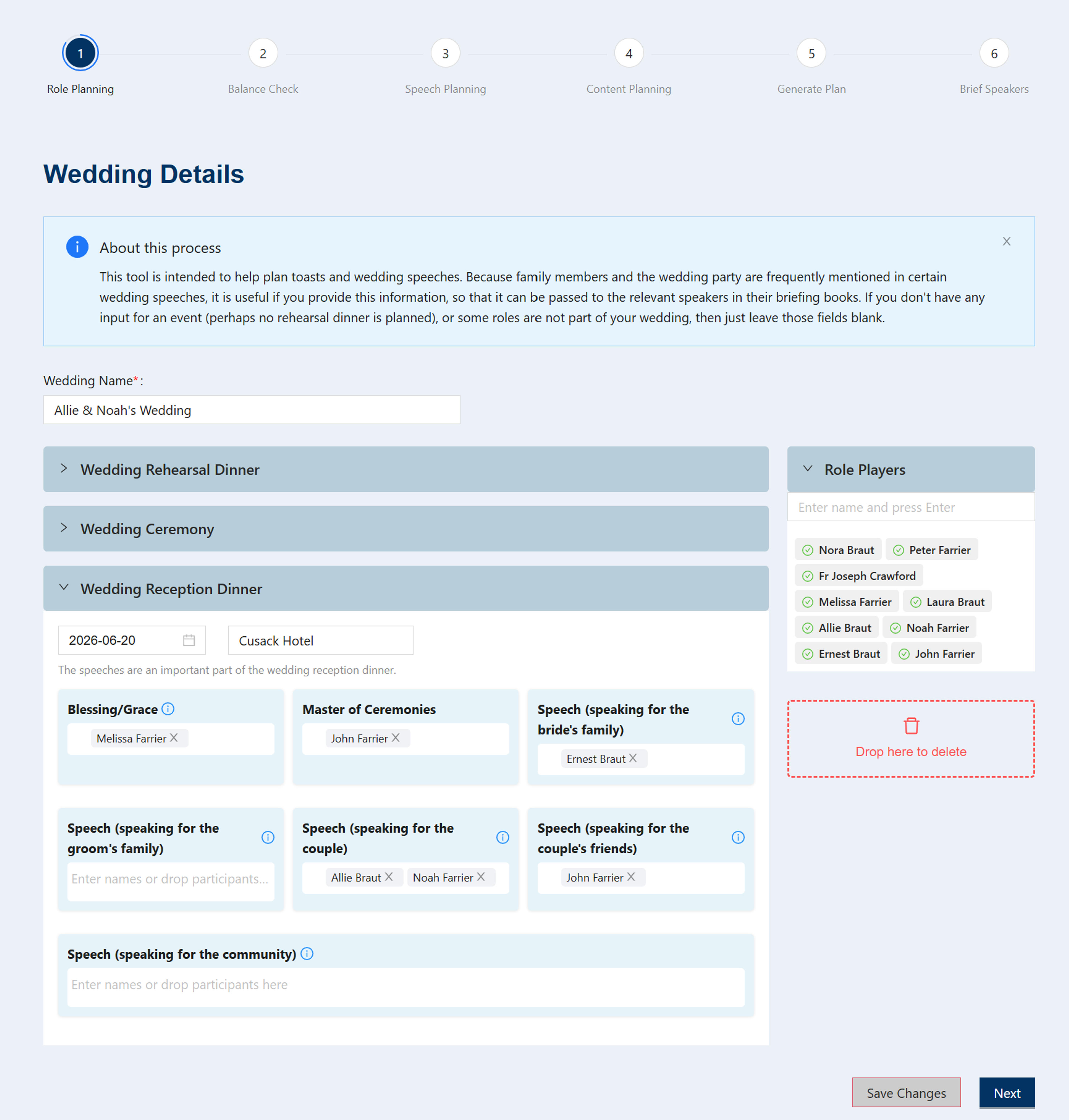
The first step in the speech planning journey is Role Planning. This is where you establish the foundation for your entire speech planning process by:
- Naming Your Wedding: Give your wedding occasion a name to help you organize and identify it
- Identifying the Couple: Provide the names of the couple getting married (this is required)
- Naming the Speakers: Enter the names of all speakers who will be giving speeches (this is required)
- Wedding Party Members: Optionally name members of the wedding party, which helps provide context and can improve the quality of speech planning
While the couple names and speaker names are required minimum information, providing additional details about the wedding party members is highly recommended as it helps create more personalized and comprehensive speech plans.
Step 2: Balance Check
Allocate Participants and Check Balance
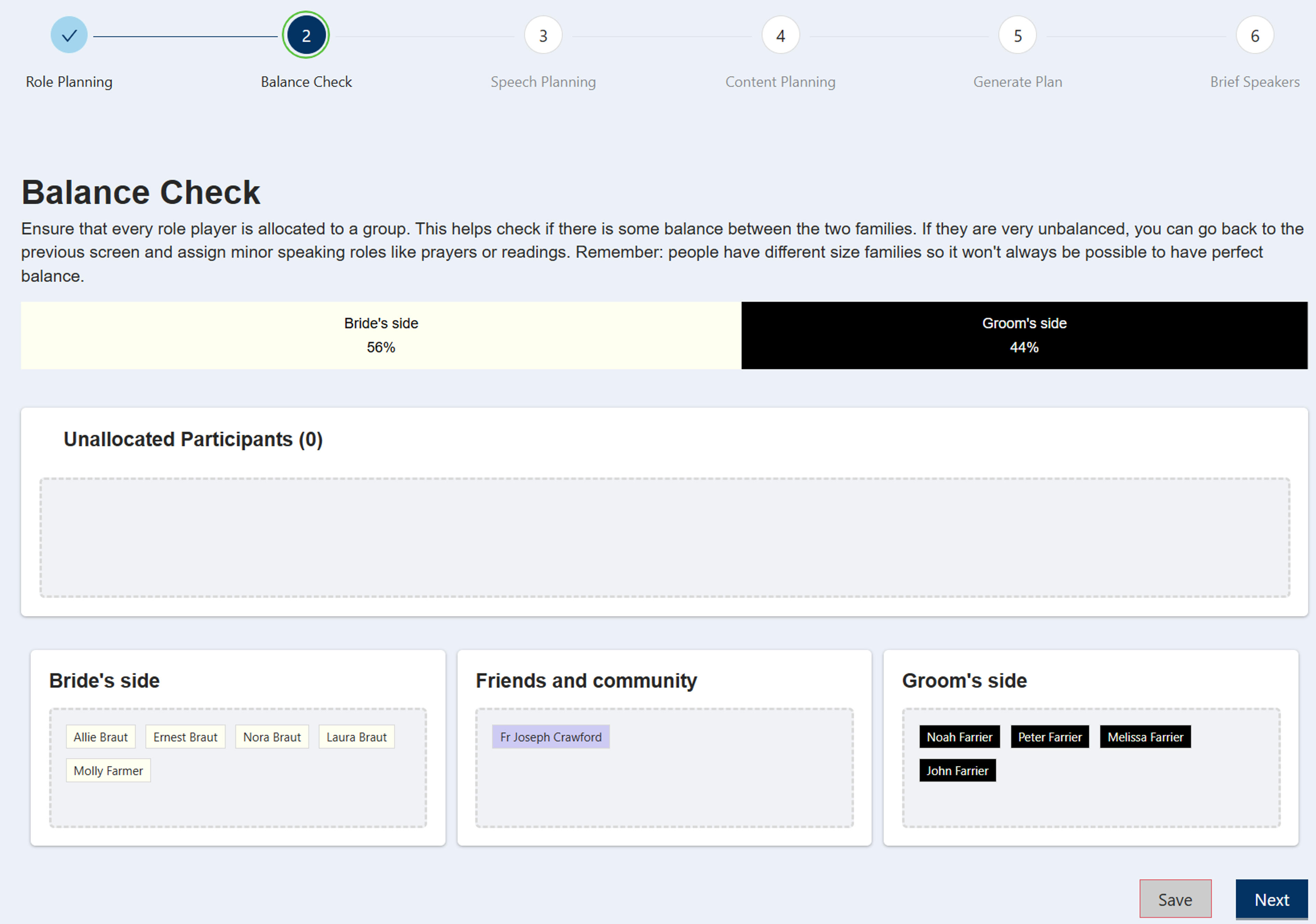
In the Balance Check step, you allocate any participants that have not already been automatically allocated to a brides, grooms, or friends group. This helps ensure that your wedding party representation is balanced across the different groups.
You can see at a glance whether there's a good distribution of participants across the brides, grooms, and friends groups.
If you notice an imbalance, you have the flexibility to go back and add participants to help balance things up. For example, you might add a Grace before meals to create a role for a family member. However, it's important to note that perfect mathematical equality isn't required; families are different sizes anyway.
Step 3: Speech Planning
Schedule Speakers and Manage Speech Timing
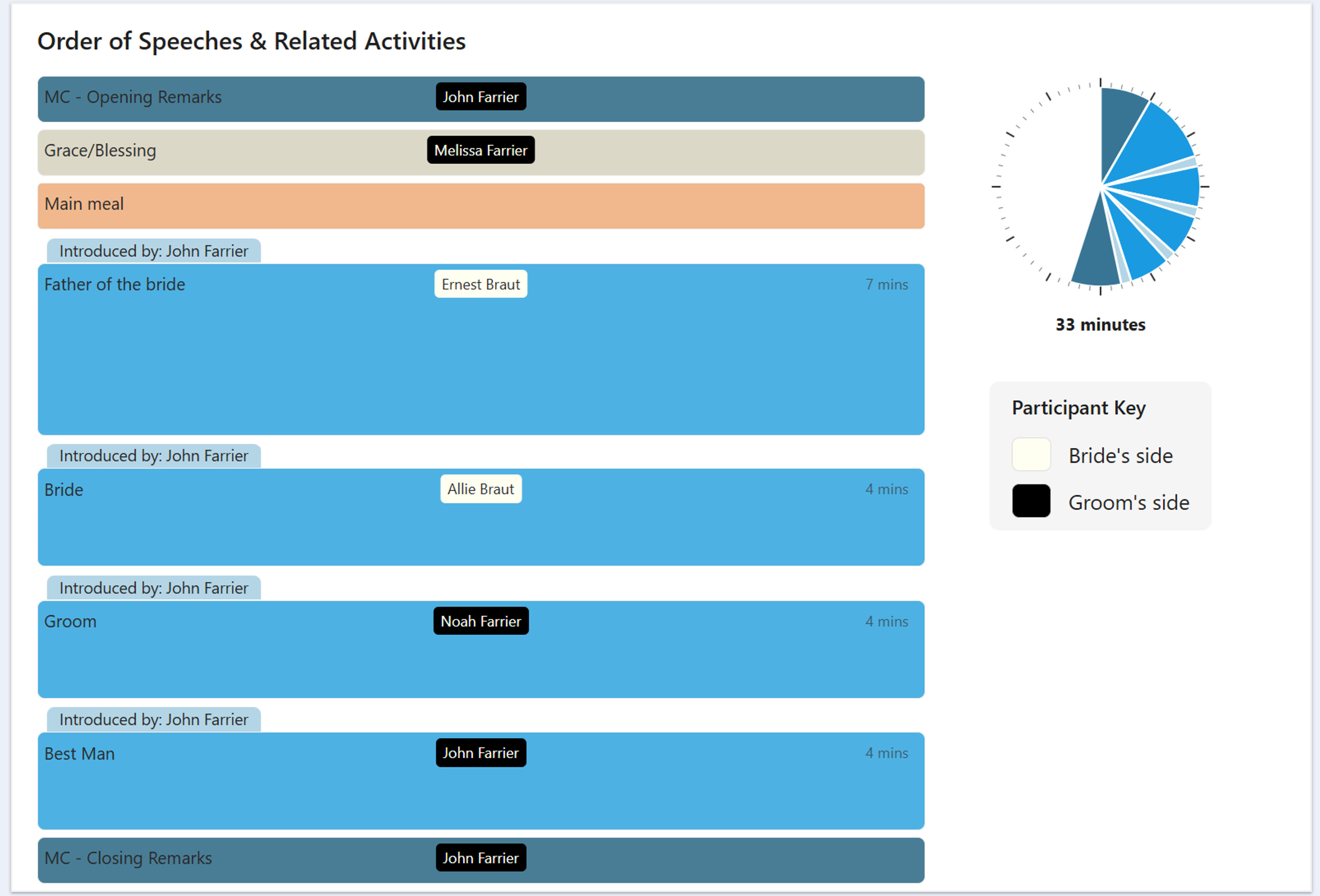
The Speech Planning screen is where you create and manage the schedule of speakers for your wedding events. When you first get to the screen you'll see a comprehensive schedule per event.
On this screen, you can view how long each speech is scheduled to last, including any introductions. This timing information helps you plan the overall flow of your event and ensure that speeches fit within your allocated time frame.
The speech planning screen gives you full control over your speaker schedule. You can:
- Adjust Time Allocation: Modify the time allocated to each speaker to better fit your event timeline
- Add Speakers: Include additional speakers to your schedule as needed
- Remove Speakers: Remove speakers from the schedule if the speech section is far too long.
- View Schedule: See the complete lineup of speakers organized by event (rehearsal dinner or reception)
Step 4: Content Editor
Customize Content Items for Each Speech
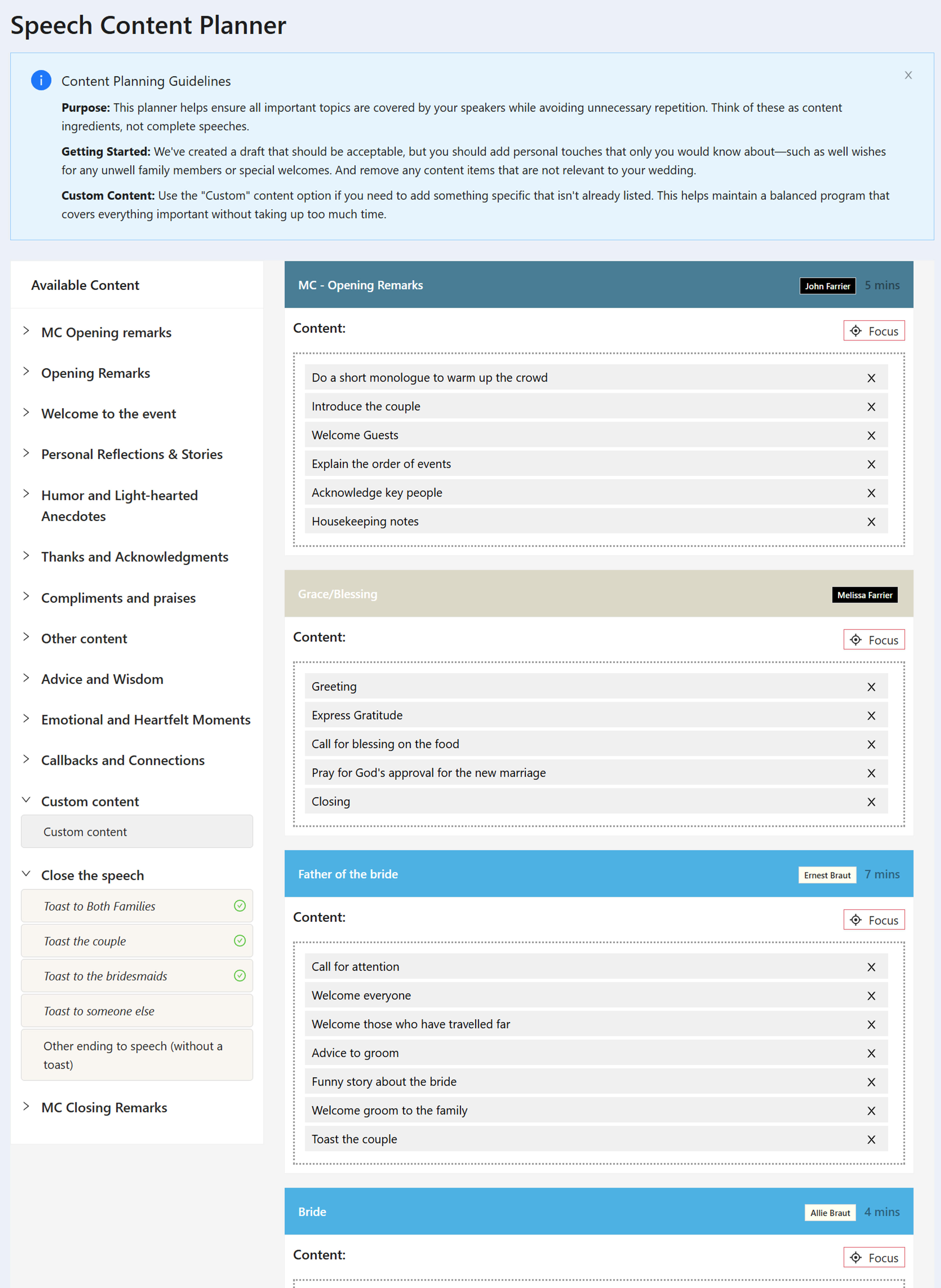
The Content Editor is where you have full control over the content items that have been generated for each speech. This powerful editing interface allows you to refine and customize the content to perfectly match your vision for each speaker's contribution.
In the content editor, you can see all the content items we have generated for each speech. From here, you have complete flexibility to:
- Add Content: Include additional content items to enhance any speech
- Remove Content: Remove content items that don't fit your vision or timeline
- Add Custom Content: Create and add your own custom content items to personalize speeches even further
- Move Content Between Speakers: Drag and drop content items from one speaker to another to better distribute topics and stories
This level of control ensures that each speech is perfectly tailored to your wedding, with the right content allocated to the right speakers at the right time.
Step 5: Generate Plan
Review Your Complete Summary Plan
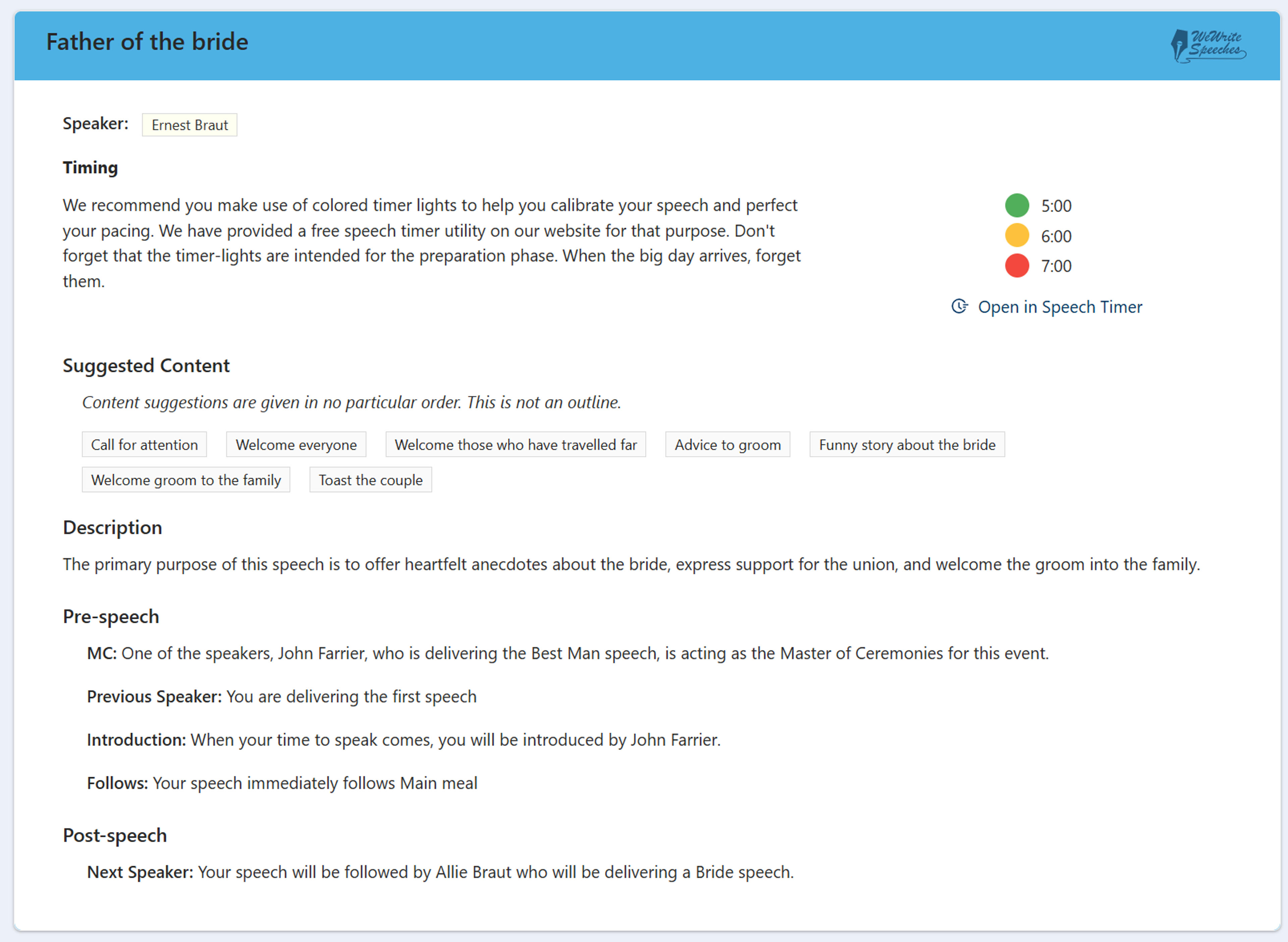
After completing all the previous steps, you'll generate your plan and get your first look at the Summary Plan. This comprehensive overview brings together all the planning work you've done into a single, cohesive document.
The summary plan provides a complete view of your speech planning journey, including all speakers, their allocated content, timing, and the overall structure of your wedding speeches. This is your opportunity to review everything before moving forward to brief your speakers.
For more detailed information about the online summary and all its features, see our dedicated page on Online Summary.
Step 6: Brief Speakers
Choose Service Levels and Assign Speakers
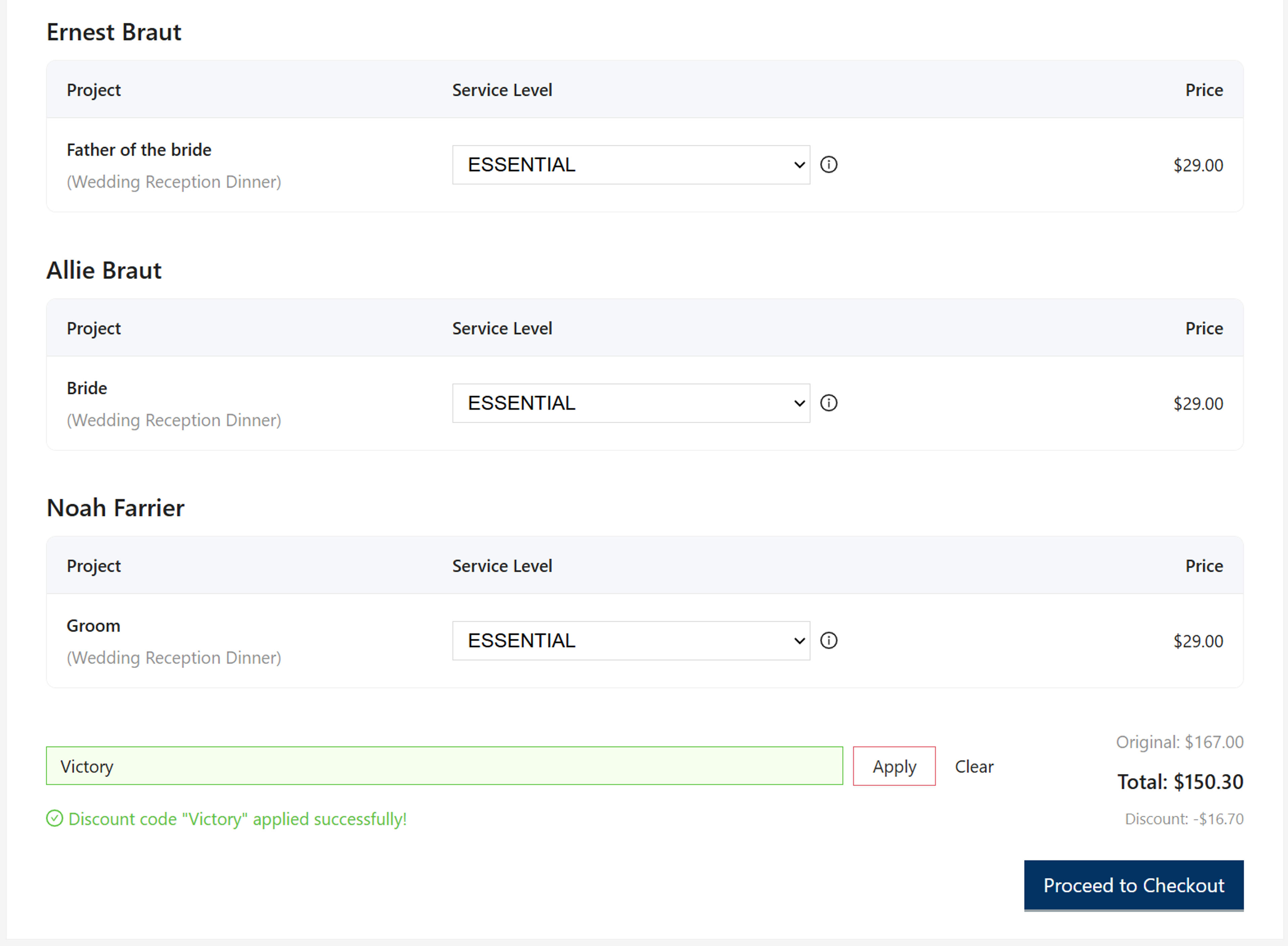
In the final step of the speech planning journey, you'll Brief Speakers by deciding which service level you want for each speaker. You have the flexibility to choose FREE for everyone, which provides basic access to the planning tools.
However, most users choose to select at least ESSENTIAL for their speakers. This service level gives speakers the tools they need to be successful while minimizing the work and anxiety that sometimes comes with the responsibility of being asked to speak. ESSENTIAL provides a more comprehensive set of features and support to help speakers feel confident and prepared.
After your transaction is successful—whether you've chosen FREE or one of the paid service levels—you can immediately assign each speech project to the appropriate speaker. This allows speakers to begin their preparation right away with access to their personalized briefing materials.
Alternatively, if you prefer to assign speakers later, you can do so from the My Projects screen. For more detailed information about assigning speech projects, see our dedicated page on Assign Speech Project.
Ready to Start Your Speech Planning Journey?
Follow the complete journey from role planning to speaker briefing. Start planning your wedding speeches today.
No registration required to get started
Quick Navigation