
Milestones & Reminders: Track Speaker Progress
Monitor how each assigned speaker is progressing through their milestones. See if speeches are on-track without seeing the speech content itself—perfect for organizers who want transparency while respecting speaker privacy.
Accessing Milestones & Reminders
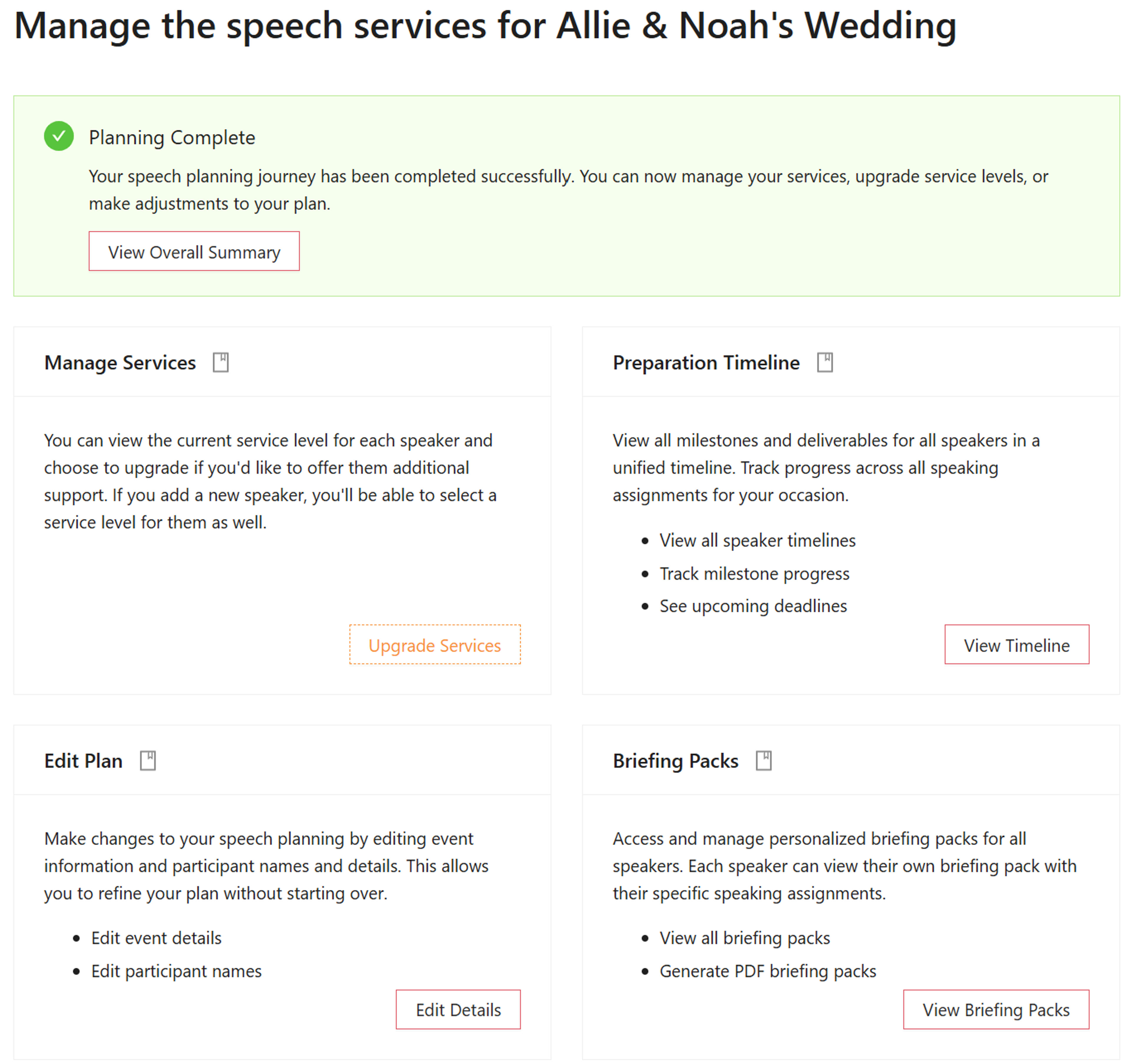
From the Manage Services Screen
The Milestones & Reminders dashboard is accessible from the Manage Services screen. This is the central hub where organizers can access all management features for their speech planning.
From the Manage Services page, click on the Preparation Timeline section to access the Milestones & Reminders dashboard. This view provides a comprehensive overview of all speakers' progress across all events.
Milestone Dashboard Overview
See All Milestones Organized by Event
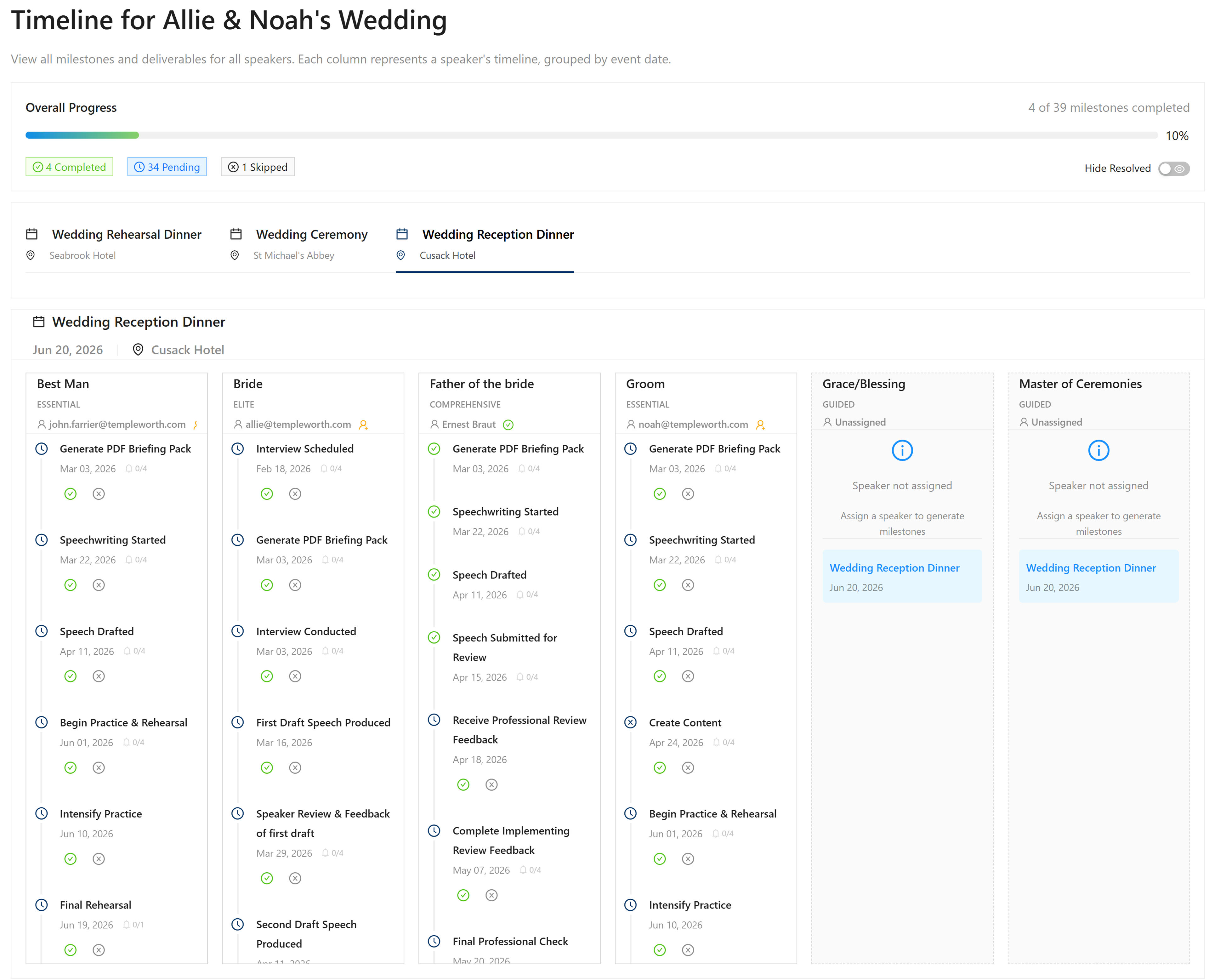
The Milestones & Reminders dashboard provides a comprehensive view of all milestones for all speakers, organized by event. This full-width view allows you to see at a glance:
- All Events: Each event (e.g., Wedding Reception, Rehearsal Dinner) has its own section
- All Speakers: See every assigned speaker for each event
- All Milestones: View the complete set of milestones each speaker must complete
- Progress Status: See which milestones are completed, pending, or overdue
The milestones differ per service level. For example, Comprehensive includes milestones related to getting the speech reviewed, whereas ESSENTIAL does not. This ensures you see the appropriate milestones for each speaker's service level.
Understanding Progress Details

What You Can See
The dashboard provides transparency into speaker progress while respecting privacy. You can see:
- Registration Status: Whether a speaker has registered or logged in to the system since their speech has been assigned
- Milestone Completion: Which milestones each speaker has achieved (e.g., "Father of the Bride (Ernest) has achieved several milestones well ahead of schedule")
- Reminder Status: How many reminders have been sent (e.g., "0 of 4 reminders sent" indicates it's still early and the speaker isn't behind schedule yet)
- Progress Timing: Whether speakers are ahead of schedule, on schedule, or falling behind
What You Cannot See: The actual speech content itself. This is intentional—it wouldn't be appropriate for the groom to see the jokes the best man is going to make at his expense. However, it is appropriate for the organizer or planner to see if the speeches are on-track.
Purpose: Transparency and Peace of Mind
Relax When Everything Is On Track
The purpose of this transparency is so that the organizer can relax if everything is going ahead of or on schedule. When you can see that all speakers are making progress and meeting their milestones, you can have confidence that preparations are proceeding smoothly.
Reach Out When Needed
If you notice a speaker is falling behind, you can reach out to them with some encouraging words. The dashboard makes it easy to identify who might need a gentle nudge or additional support, allowing you to be proactive rather than reactive.
How Reminders Work
Automated Reminders
The system automatically sends reminders to encourage each speaker to get started and stay on track. These reminders are sent at strategic intervals leading up to milestone deadlines.
Smart Reminder System
If a speaker has already achieved a milestone, they won't receive reminders for that milestone at all. This keeps the reminder system helpful and non-intrusive—we remind them so you don't have to.
Understanding Reminder Status
The dashboard shows reminder status like "0 of 4 reminders sent". This tells you:
- Early Stage: If 0 reminders have been sent, it's still early in the timeline and the speaker isn't behind schedule yet
- Progress Tracking: As reminders are sent, you can see how many have been delivered, giving you insight into where each speaker is in their preparation timeline
- No Unnecessary Reminders: If a milestone is already completed, no reminders will be sent for that milestone, keeping the system efficient and respectful
Key Features
Progress Transparency
See how each speaker is progressing through their milestones without seeing the speech content itself.
Organized by Event
View all milestones organized by event, making it easy to see progress across all your wedding events.
Registration Status
See if speakers have registered or logged in after their speech has been assigned to them.
Milestone Completion
Track which milestones each speaker has achieved, helping you identify who's ahead of schedule.
Reminder Tracking
See how many reminders have been sent, helping you understand where each speaker is in their timeline.
Service Level Awareness
Milestones differ per service level—Comprehensive includes review milestones, ESSENTIAL does not.
Privacy Respect
See progress and status without seeing speech content, maintaining appropriate boundaries.
Timeline Context
Understand whether speakers are ahead of schedule, on schedule, or need encouragement.
Quick Navigation